 by
by 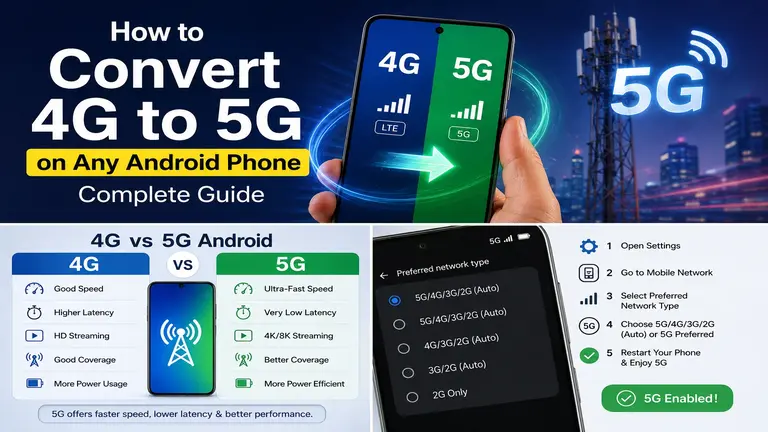
How to Convert 4G to 5G on Any Android Phone is one of the most searched questions among Android users today. Many people see videos claiming you can convert 4G to 5G with a simple app, secret code, or hidden Android setting. Unfortunately, most of those claims are misleading or completely false. If you’ve been wondering whether you can convert 4G to 5G, this guide explains what is actually possible and what is simply a myth.
Imagine buying a reliable 4G smartphone a few years ago. It handled social media, streaming, gaming, and video calls without any issues. Then your mobile carrier launched 5G, and suddenly everyone started talking about faster downloads, lower latency, and better connectivity. Naturally, you may start searching for How to Convert 4G to 5G on Any Android Phone instead of purchasing a new device. This guide will help you understand the difference between hardware and software, explain how to enable 5G on Android if your phone already supports it, and show you the safest way to enjoy a 5G network.
Can You Really Convert a 4G Phone to 5G?
A true 4G-only Android phone cannot be converted into a genuine 5G phone using an app, software update, rooting, or secret dialer codes.
The reason is straightforward. A 5G smartphone contains dedicated hardware that communicates with 5G cellular towers. If that hardware is missing, no software can magically create it.
Many YouTube videos claim you can convert 4G to 5G by installing an APK or changing Android 5G settings. These videos often generate millions of views, but they rarely explain the technical reality.
Think of it like trying to play a Blu-ray disc in a DVD player. No software update can add the missing Blu-ray laser. The same principle applies to mobile networks.
However, there is one important exception.
If your Android phone already supports 5G but the feature is disabled by default, you can often enable 5G on Android through the network settings. In this case, you are not converting a 4G phone into a 5G phone. You are simply activating hardware that already exists inside the device.
Understanding the Difference Between 4G and 5G
Before searching for How to Convert 4G to 5G on Any Android Phone, it helps to understand what separates these two technologies.
What is 4G?
4G stands for the fourth generation of mobile communication technology. It offers fast internet speeds, HD video streaming, online gaming, and reliable voice calls. Most Android phones released before 2020 are 4G devices.
What is 5G?
5G is the fifth generation of wireless technology. It provides significantly faster download speeds, lower latency, improved network capacity, and better performance in crowded areas. A 5G phone includes dedicated hardware designed specifically for modern cellular networks.
4G vs 5G Android: Quick Comparison
Here is a quick comparison.
| Feature | 4G | 5G |
|---|---|---|
| Maximum Speed | Fast | Much Faster |
| Latency | Higher | Very Low |
| Streaming | HD | 4K & 8K Ready |
| Gaming | Good | Excellent |
| Download Speed | Good | Extremely Fast |
| Future Support | Limited | Long-Term |
The biggest difference is not just speed.
A 5G phone contains a 5G modem, compatible antennas, supported frequency bands, and a processor capable of communicating with 5G infrastructure. Without these components, you cannot upgrade a 4G phone to 5G.
How to Check If Your Android Phone Already Supports 5G
Many people assume they own a 4G device when their phone actually includes 5G support. Before attempting to convert 4G to 5G, you should check if your phone supports 5G.
Check Android 5G Settings
- Open Settings.
- Tap Network & Internet or Mobile Network.
- Select your SIM card.
- Look for Preferred Network Type.
If you see options like 5G/LTE/3G/2G, your phone supports 5G.
Search Your Phone Model
- Visit the manufacturer’s official website.
- Search your exact phone model.
- Read the network specifications.
If the specifications list 5G bands, your phone is already compatible.
Check the IMEI or Model Number
You can also search your phone model on trusted specification websites. This is one of the quickest ways to check if phone supports 5G.
How to Enable 5G on a Supported Android Phone
If your smartphone already supports 5G, enabling it is usually very easy.
Step 1: Open Settings
- Go to Settings.
- Open Network & Internet or SIM & Mobile Network.
Step 2: Select Mobile Network
- Choose the SIM card that supports mobile data.
Step 3: Change Preferred Network
- Tap Preferred Network Type.
- Choose 5G/4G/3G/2G Auto or 5G Preferred.
Step 4: Restart the Phone
- Restarting refreshes the network connection.
Step 5: Verify the Connection
- Look for the 5G icon near the signal bars.
- If it appears, congratulations.
- You have successfully enabled the 5G network.
If you do not see the option, your device, SIM card, carrier, or location may not support 5G.
Also Check : Join TikTok’s Creativity Program Beta
Reasons Why 5G Is Not Showing on Your Phone
Many users ask why 5G not showing on Android even though their phone supports it. Here are the most common reasons.
Your Phone Does Not Support 5G
This is the most common reason. Hardware cannot be added through software.
Your Carrier Hasn’t Enabled 5G
Some mobile providers require customers to switch to a 5G-compatible plan.
You’re Outside 5G Coverage
If your area has only LTE towers, your phone will continue using 4G.
Your SIM Card Is Too Old
Older SIM cards sometimes do not support newer network technologies. Ask your carrier whether you need a replacement.
Software Needs Updating
Install the latest Android security and system updates.
Manufacturers often improve network compatibility through firmware updates.
Battery Saver Is Enabled
Some Android phones disable 5G to save battery. Turning off Battery Saver may restore the 5G option.
Apps That Claim to Convert 4G to 5G
Search Google Play and you’ll find dozens of apps claiming to convert 4G to 5G. While many of these apps appear convincing, it’s important to understand what they actually do before installing them.
Most of these apps advertise features such as:
- One-click 5G activation.
- Unlocking hidden Android 5G settings.
- Faster internet with a single tap.
- Switching between 4G and 5G network modes.
- Improving network speed and signal strength.
However, the reality is very different.
- No app can install a physical 5G modem inside your smartphone.
- No APK can replace missing antennas.
- No optimization tool can convert 4G to 5G.
- Some apps simply open existing Android network settings.
- Others only display advertisements.
- A few may even request unnecessary permissions.
Always download apps carefully and avoid software that promises impossible hardware upgrades.
When Should You Upgrade to a 5G Phone?
If your current phone is several years old, upgrading may be the smartest decision.
Here are a few signs.
- Your phone supports only 4G.
- Your battery drains quickly.
- Performance has become slow.
- Your carrier offers excellent 5G coverage.
- You stream videos frequently.
- You play online games.
- You work remotely using mobile data.
Modern 5G phones are also more future-proof. Manufacturers continue optimizing new software for 5G hardware.
If you’re planning to keep your next phone for several years, investing in a genuine 5G device makes sense.
Final Verdict
If you searched for How to Convert 4G to 5G on Any Android Phone, the most important takeaway is that software alone cannot transform a genuine 4G-only smartphone into a 5G device. A real 5G connection requires specialized hardware, including a compatible modem, antennas, and supported network bands. No app, secret code, rooting method, or software update can replace these physical components.
However, if your Android phone already includes 5G hardware, you can often enable 5G on Android through the built-in network settings, provided your carrier, SIM card, and location also support 5G. Before spending money on third-party apps or following misleading tutorials, always check if your phone supports 5G and verify that 5G coverage is available in your area. If your current device is limited to 4G hardware, upgrading to a genuine 5G smartphone is the only reliable way to enjoy faster speeds, lower latency, and a future-ready mobile experience.
FAQs
Can software convert a 4G phone into a 5G phone?
No. Software cannot add the hardware required for 5G connectivity.
Can rooting enable 5G on Android?
No. Rooting cannot install a 5G modem or compatible antennas.
Why doesn’t my phone show the 5G option?
Your phone may not support 5G, your carrier may not offer 5G, your SIM card may be outdated, or there may be no 5G coverage in your area.
Can a software update add 5G support?
Only if your phone already includes 5G hardware and the manufacturer enables the feature. It cannot add missing hardware.
Which Android phones support 5G?
Most Android phones released in recent years with a built-in 5G modem support 5G, including many models from Samsung, Google, Xiaomi, OnePlus, Motorola, OPPO, vivo, and realme.
How do I know if my SIM supports 5G?
Contact your mobile carrier or check your account details. Many providers also indicate 5G compatibility in their apps.
Is there any app that converts 4G to 5G?
No. No legitimate app can convert a true 4G-only phone into a 5G phone.
Can I use 5G with a 4G SIM card?
It depends on your carrier. Some 4G SIM cards work on 5G networks, while others require a newer SIM.
Does enabling 5G drain the battery faster?
Yes. 5G can consume more power in some situations, although newer phones manage battery usage much more efficiently.
Is upgrading to a 5G phone worth it in 2026?
Yes. If you plan to keep your phone for several years and your carrier offers good 5G coverage, upgrading to a genuine 5G smartphone is a worthwhile investment.


